ChemometricSolutions - Software

Custom Software Development

Tailored applications and analytical tools designed specifically for your needs

Custom Applications

We develop custom applications using Python, creating interactive, user-friendly interfaces for complex chemometric analyses. Our applications are designed to:

Web-Based Accessibility

Access your custom tools from anywhere through a web browser, with no need for software installation or maintenance

Industry-Specific Solutions

Applications tailored to pharmaceutical, food, chemical, and environmental industry requirements and workflows

Interactive Dashboards

Real-time data visualization and analysis with user-friendly interfaces that make complex statistics accessible

System Integration

Seamless integration with your existing databases, LIMS systems, and analytical instruments

Example Applications:

  • Process Monitoring Dashboards: Real-time multivariate control charts and quality metrics
  • Method Development Tools: Interactive DoE planning and optimization interfaces
  • Data Analysis Platforms: Custom PCA, PLS, and classification workflows
  • Quality Control Systems: Automated batch release and trend analysis tools
  • Multivariate Image Analysis: Automatic textural feature extraction, fingerprinting, and batch uniformity monitoring on production images
  • Regulatory Reporting: Automated generation of validation and compliance reports

Ready to discuss your custom software needs?

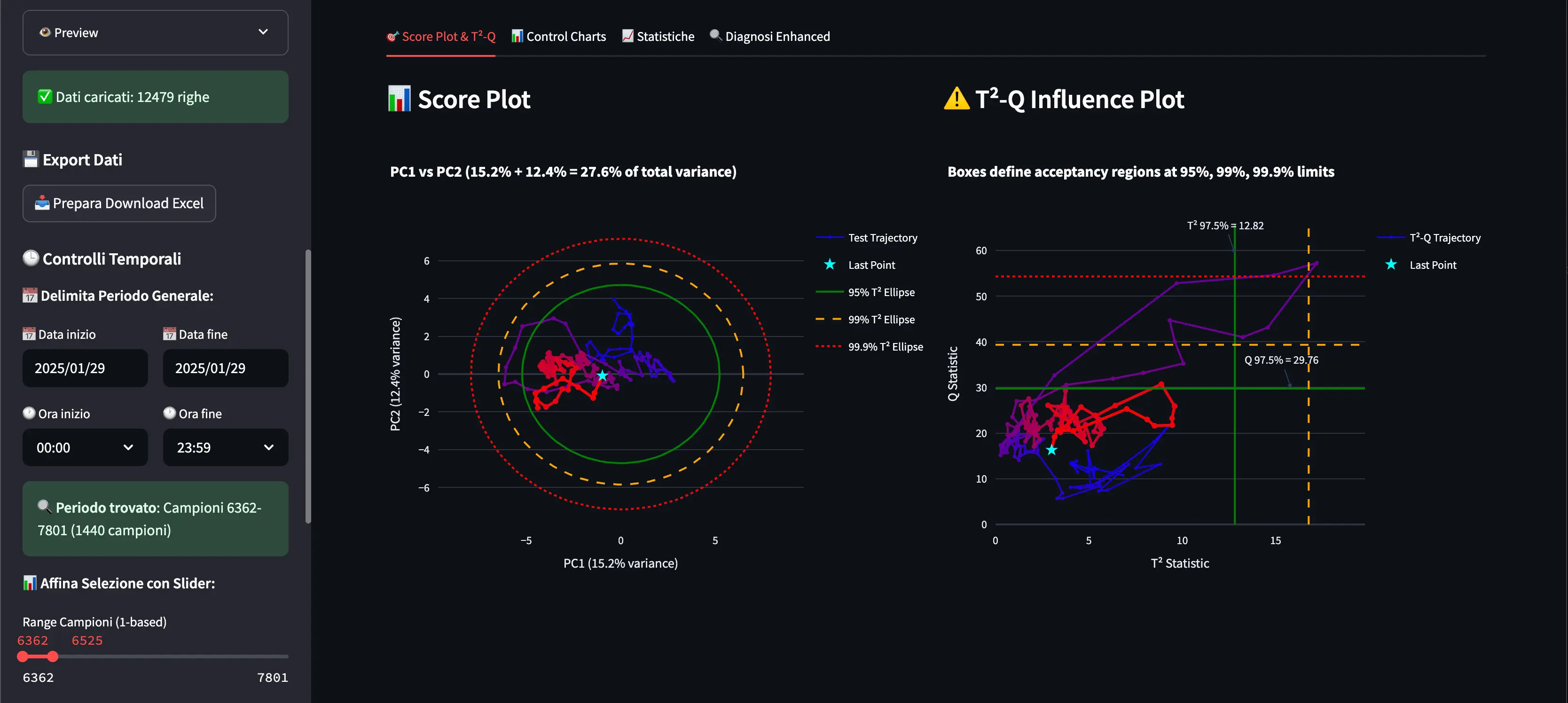
Custom Streamlit Dashboard
Example of a custom Streamlit web application for process monitoring
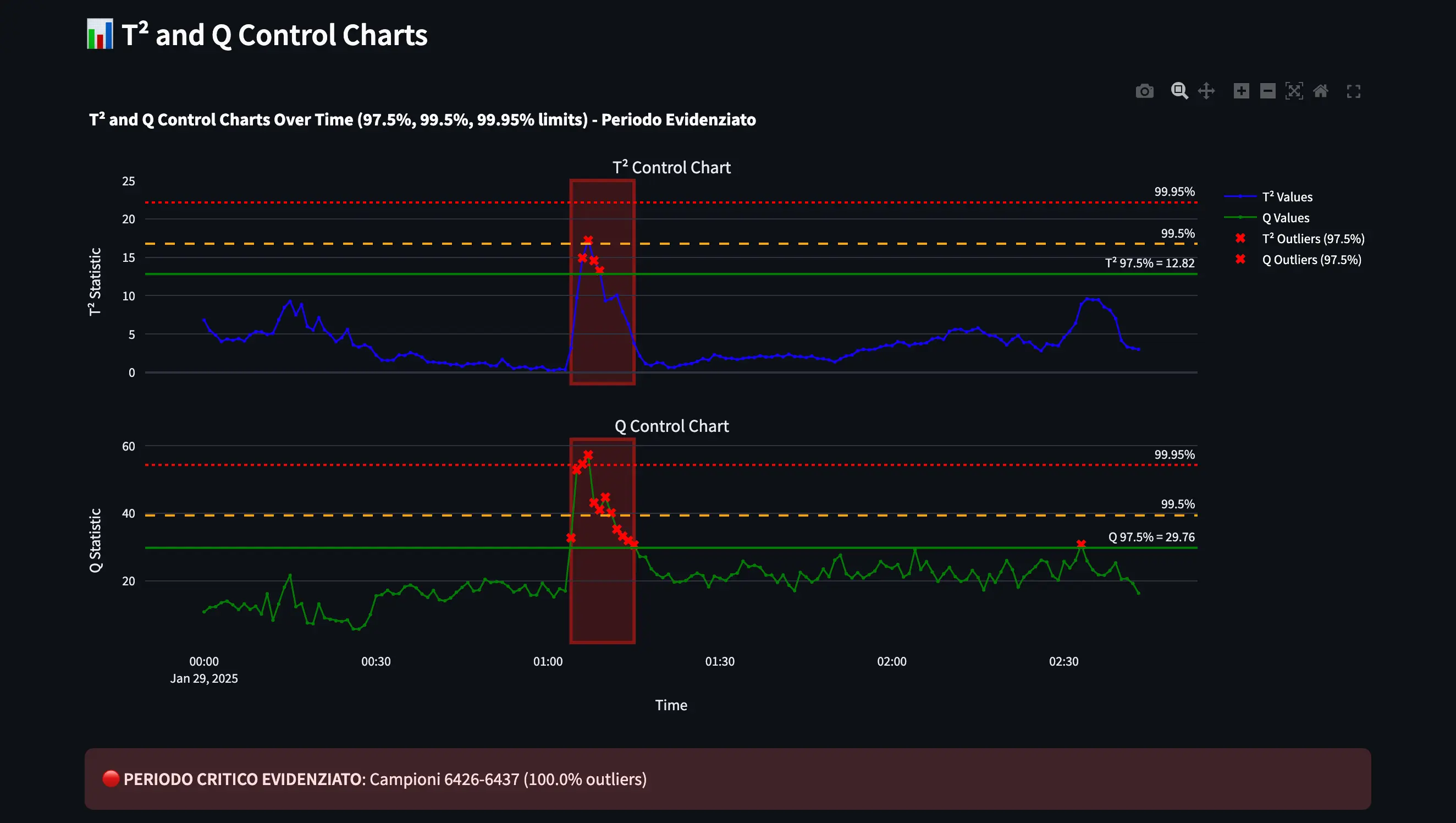
Custom Streamlit Analytics
Advanced analytics dashboard with interactive visualizations
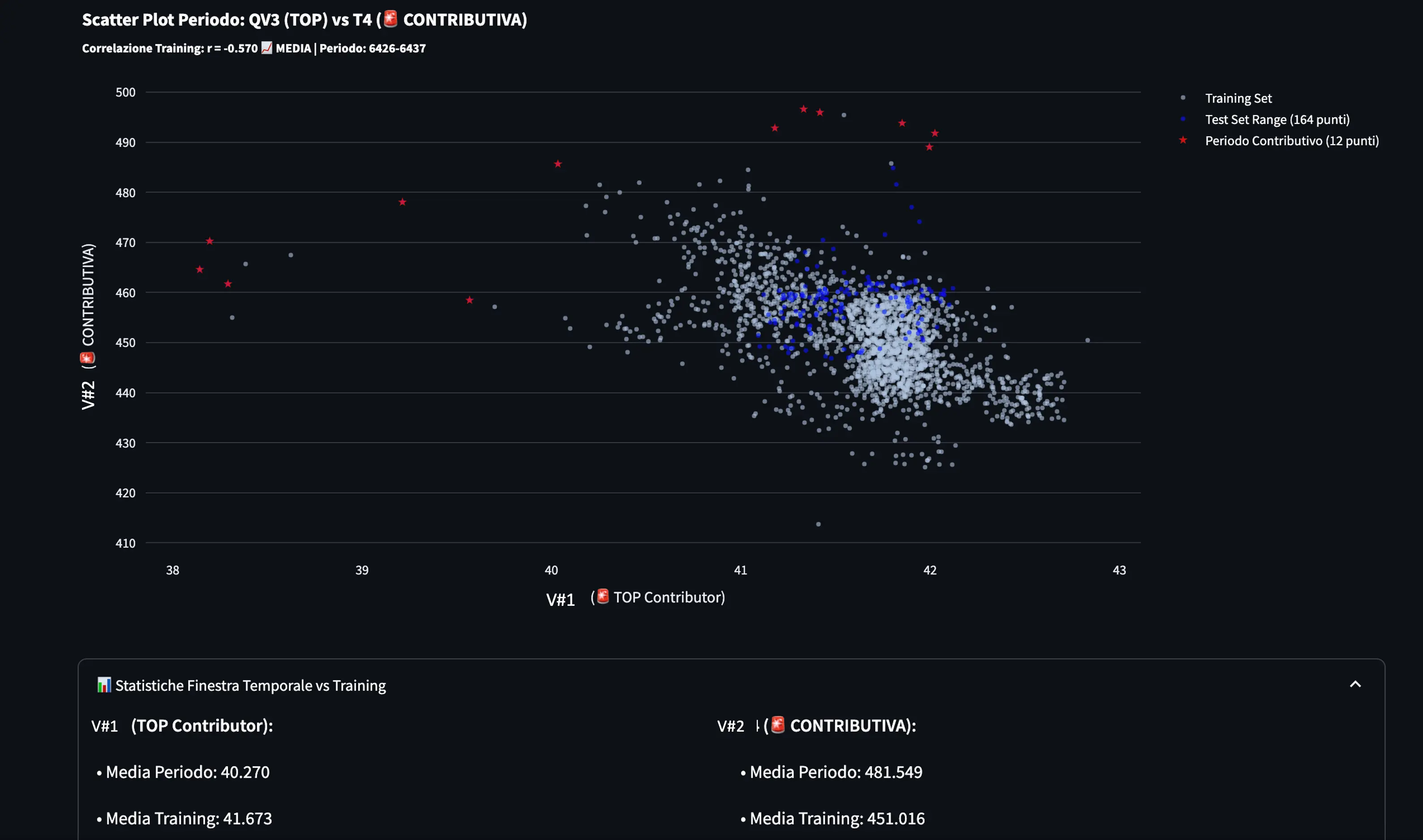
Custom Process Control
Real-time process control and monitoring interface

PyCAT Live Demo

Python Chemometric Agile Tool

PyCAT is our next-generation web-based chemometric platform built entirely in Python. It brings the full power of chemometric analysis to your browser — no installation required. From data import to multivariate modelling, PyCAT covers the entire analytical workflow in an intuitive, interactive interface.

Try PyCAT Now

Data Handling

Import and manage multiple datasets; define X/Y/meta blocks and switch between workspaces

Univariate Analysis

Descriptive statistics, histograms, boxplots and group-level profiles with automatic categorical/numeric detection

Bivariate Analysis

Correlation ranking, scatter plots, pairs plot and correlation heatmap for all variable pairs

Data Visualization

2D/3D scatter plots, ternary diagrams and mixture simplex visualisation with flexible color mapping

Transformations

Complete suite of row/column pre-treatments: SNV, MSC, derivatives, centering, scaling and DoE coding

PCA

Interactive Principal Component Analysis with score, loading, influence and correlation loading plots

Quality Control

PCA-based multivariate control charts (T² and Q) for real-time batch and process monitoring

Generate DoE

Generate full-factorial, fractional, D-optimal and custom experimental designs ready for export

MLR / DoE

Multiple Linear Regression on designed experiments with response surface and optimisation tools

Multi-DoE

Simultaneous multi-response DoE with weighted Pareto optimisation across all responses

Mixture Design

Simplex centroid designs, Scheffé polynomial models, pseudo-components and ternary response surfaces

Classification & Class Modelling

k-NN, LDA, QDA and SIMCA class-modelling with cross-validation and prediction on new samples

PLS Calibration

Full PLS regression pipeline with cross-validation, variable importance (VIP) and prediction

PLS Inverse

Inverse PLS calibration for spectroscopic quantification with leave-one-out validation

Variable Selection

Genetic Algorithm-based variable selection to identify the most informative subset for PLS or classification

NWAY Analysis

Tucker3 and PARAFAC decomposition for three-way data (batch, time-series, hyperspectral cubes)

MCR-ALS

Multivariate Curve Resolution — resolves mixed spectra into pure component concentration and spectral profiles

Image Transformation

Masking and pre-treatment for grayscale, RGB and hyperspectral images (threshold, k-means, PCA score surface)

Imaging Analysis

Feature extraction (texture, morphology, particle size/shape) and chemometric analysis on multi-sample image sets

Ready to explore chemometrics in your browser? The live demo is free and requires no sign-up.

Open PyCAT Demo

CAT

CAT (Chemometric Agile Tool) is our R-based chemometric software, designed to bridge the gap between complex statistical theory and practical applications. Initially developed by R. Leardi, C. Melzi, G. Polotti, CAT provides a user-friendly interface while maintaining powerful analytical capabilities.

Our software is specifically designed for researchers, quality control specialists, and industry professionals who need to extract meaningful information from complex chemical data without requiring advanced programming skills.

Key Benefits:

  • Intuitive interface that guides users through the analysis process, one of the most used for teaching in universities
  • Comprehensive suite of multivariate analysis techniques
  • Integrated experimental design tools
  • Free and open-source, making it accessible to everyone
  • Regular updates and community support
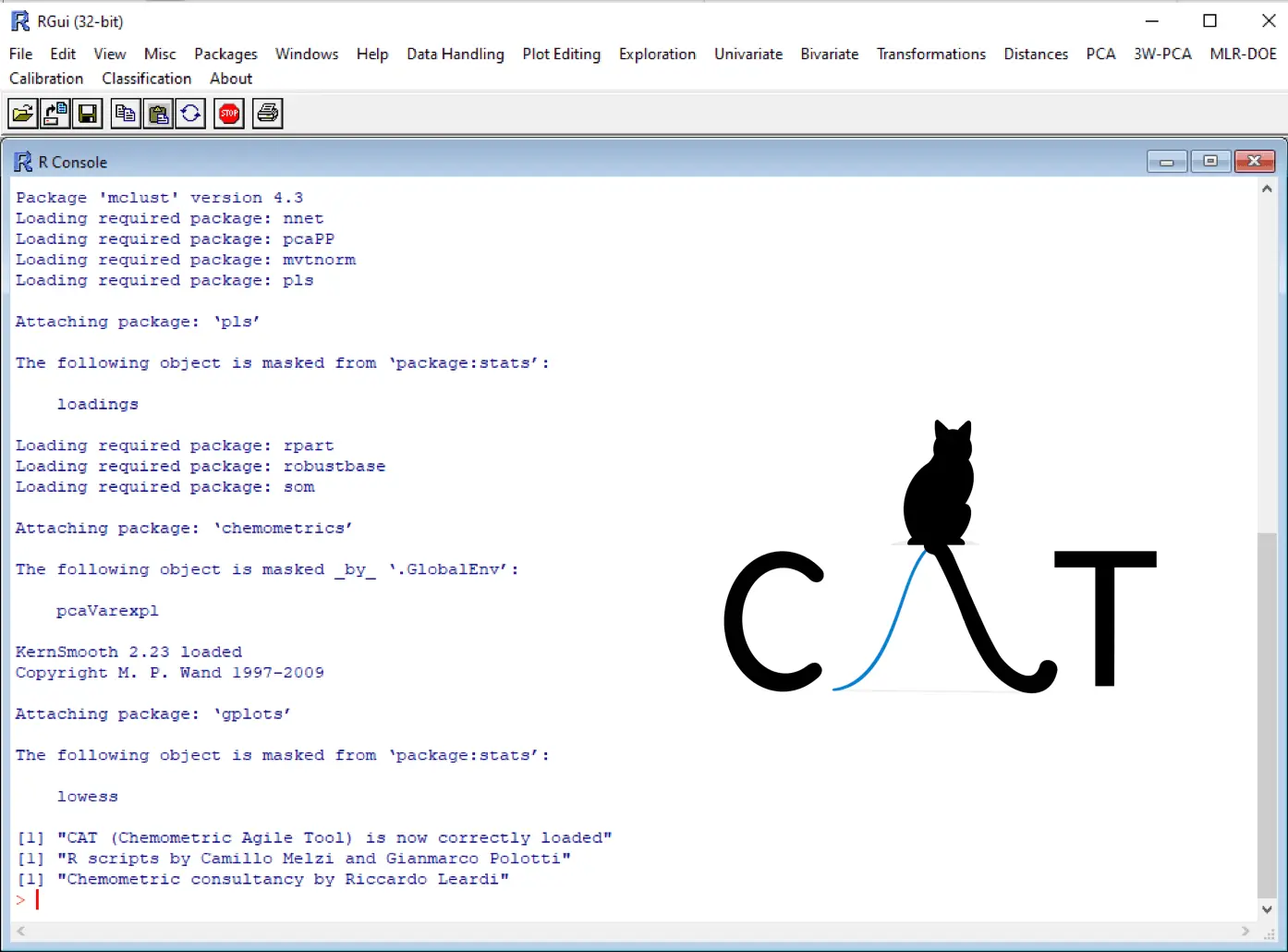
CAT Software Interface

Powerful Features

Discover the capabilities that make CAT the tool of choice for chemical data analysis

Multivariate Analysis

Comprehensive suite of techniques including PCA, PLS, PCR, and discriminant analysis, with intuitive visualization of results and detailed interpretation guides.

Experimental Design

Tools for designing efficient experiments through the MLR-DoE menu, including D-optimal design.

Transformations

The most commonly used routines in chemometrics for row and column transformations.

Classification Models

Build classification models using k-NN, LDA, QDA, class-modelling with comprehensive validation tools.

Data Visualization

Interactive and customizable plots including score plots, loading plots, influence plots, and correlation loadings to help you gain insights from your data.

Data Import/Export

Flexible import capabilities supporting various file formats (CSV, Excel, TXT) and export options for results, models, and graphics for seamless integration with other tools.

How It Works

A simple workflow that guides you from data to insights

1

Import Your Data

Start by importing your dataset in various formats (CSV, Excel, text files). CAT provides initial summary and univariate statistics to help you understand your data.

2

Preprocess and Explore

Apply the appropriate preprocessing techniques (scaling, centering, transformations). Use exploratory tools like PCA to visualize the data structure and identify patterns.

3

Build and Validate Models

Develop predictive or classification models. CAT provides comprehensive validation tools to ensure your models are robust and reliable.

4

Experimental Design (DoE)

Discover the MLR-DoE menu to discover the potential.

Learning Resources

Materials to help you get the most out of our software

Video Tutorials

Step-by-step video guides demonstrating how to use the software for various applications.

Watch Tutorials

Documentation

Comprehensive reference materials for all features of CAT (istructions.pdf).

View Documentation

Example Datasets

Sample datasets with case studies to help you practice and understand different analytical techniques (working.rar).

Download Examples

What Users Say

Feedback from professionals using our software in their work

CAT is a helpful and loyal companion. Its user-friendly design and the clear readabilty of its outputs are the reasons why I use it every day in pharmaceutical development.

Dr. Diego Copelli, PhD

Dr. Diego Copelli, PhD

R&D, Senior Scientist, Chiesi Farmaceutici

As a university professor, I find CAT invaluable for teaching chemometrics. Its intuitive interface allows students to focus on understanding the concepts rather than struggling with the software.

Prof. Lisa Magnaghi, PhD

Prof. Lisa Magnaghi, PhD

Analytical Chemistry Department, University of Pavia

The Experimental Design tools (MLR-DOE) in CAT have transformed our department's approach to research. We can now develop studies with greater objectivity and methodological rigor.

Dr. Elena Conti

Dr. Matilde Cirignano, PhD

Researcher R&D, HA Italia

Frequently Asked Questions

Find answers to common questions about our software

What operating systems does CAT support?

CAT is compatible with Windows (7, 8, 10, and 11); macOS ONLY with virtual machine.

Do I need programming skills to use CAT?

No, CAT is designed with a user-friendly graphical interface that doesn't require programming knowledge. All features are accessible through intuitive menus and dialogs.

How does CAT compare to other commercial software?

CAT offers comparable functionality to many commercial packages while remaining free and open-source. Our focus is on making advanced chemometric techniques accessible and easy to use. While some specialized commercial packages may offer additional industry-specific features, CAT provides all the essential tools needed for most chemometric analyses.

How can I get support if I encounter issues?

We offer multiple support channels for CAT users. For more urgent issues, you can contact our support team directly via email.

Is CAT suitable for teaching chemometrics?

Absolutely! CAT is widely used in educational settings by many experts (academic and industrial).

How often is CAT updated?

We release major updates approximately twice a year, with minor updates and bug fixes released as needed. Our development roadmap is influenced by user feedback and advancements in the field of chemometrics. We're committed to keeping CAT at the forefront of chemometric software.

Ready to transform your data analysis?

Download our free software today and discover the power of chemometrics in your research or industrial applications